MFPD / FIVEM POLICE RESOURCES
MFPD-MDT
VERSION 4.1.0 • MOBILE DATA TERMINAL
Video Preview
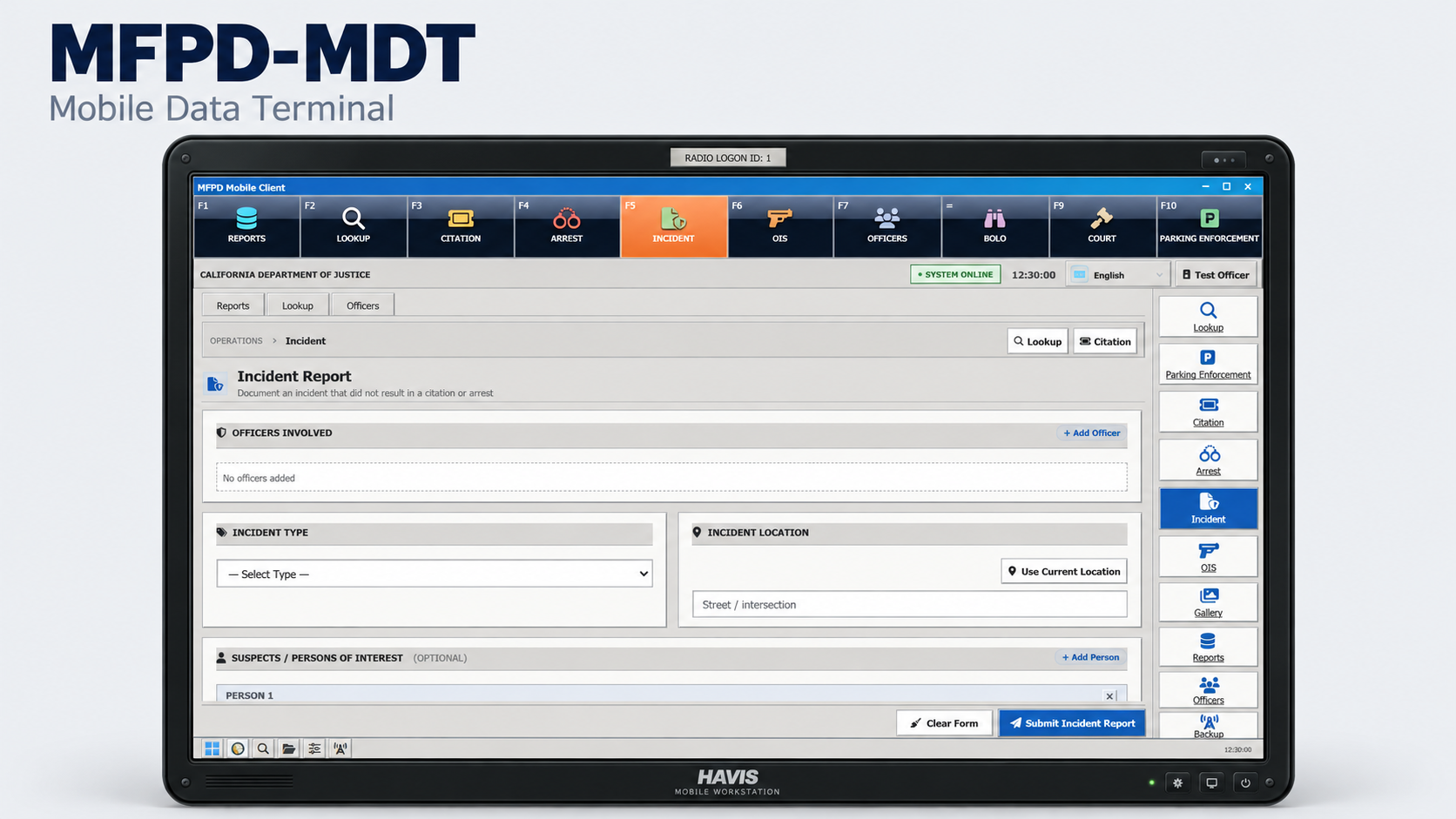
Watch the MFPD-MDT Preview →MFPD-MDT is an in-game police terminal for FiveM. It provides report preparation, person and vehicle inquiries, BOLO records, evidence photographs, officer status, backup requests and court case tracking. The package includes MFPD-Dispatch and MFPD-ParkingMeters for dispatch operations and parking enforcement.
Package overview
Three MFPD resources, eight interface styles, four interface languages, physical citation and DUI papers, editable configuration and integration adapters, and setup documentation. Person and vehicle inquiries use a separately configured records provider.
Reports, narratives and evidence
Prepare citation, arrest, incident and officer-involved shooting reports. Record the relevant officers, people, vehicles, locations, charges and narratives in the corresponding forms, then browse filed documents through the report archive.
- Editable charge catalog and report wording.
- Narrative formatting tools for headings, emphasis, lists, quotations, links and other supported formatting, with a preview.
- Officer signatures and report-specific evidence notes.
- Evidence photography through screenshot-basic, a photograph gallery and image attachments in supported reports.
- Physical citation and DUI papers, including configurable handling animations and handoff to eligible nearby NPCs.
- Incident summary views in supported layouts, with autofill controls for available location, officer, inquiry and assigned-call information.
The archive uses a report index for browsing and requests complete report content and photographs when needed. Reports and court cases are stored in JSON files within the resource.
Arrest basis, warrants and court records
Arrest paperwork distinguishes warrantless arrests from arrests or custody on a warrant. Warrant entries provide fields for the type, reference number, issuing authority, issue date, confirmation contact, grounds and service conditions.
An included California/U.S. warrant reference provides descriptions and separates arrest selections from reference-only documents. Recording a warrant in a report documents the stated arrest basis; it does not issue a warrant through an external records system.
Court records can be linked to source reports and participants. The in-game case workflow tracks proceeding types, participant roles, review phases, timelines and outcomes, including criminal matters, officer-involved shooting review, subpoenas, civil matters and traffic adjudication.
Person and vehicle inquiries
Search for people and vehicles through the selected records provider. Results display the identity, license, warrant, ownership, registration, insurance and vehicle information that the provider supplies. Available results and recent checked identities or plates can assist with report entry.
- FivePD: the supplied provider connects inquiries to an existing FivePD installation. FivePD is selected in the default configuration.
- ERS: the supplied adapter receives NPC and vehicle observations from supported ERS interactions. Searches are limited to records observed by the same officer while those records remain in the session cache. It does not provide unrestricted population or historical database searches. ERS is disabled until configured; some installations require the documented hook calls.
- Other records systems: editable client and server adapters provide a documented interface for mapping another data source. The adapter must implement the required queries and return structure.
Inquiry availability and record completeness depend on the selected provider. Manual report entry remains available when records inquiries are disabled.
BOLOs, officer status and backup
- Person and vehicle BOLO records with status updates.
- Officer status controls and an officer overview.
- Backup requests with officer details, location information, response tracking and waypoint controls.
- Optional BOLO plate alerts through compatible radar exports or a replacement service adapter.
Included supporting resources
MFPD-Dispatch
The included dispatch resource provides a dispatch panel, live unit map, incident records, unit assignments, status updates, messages and broadcasts. Assigned-incident information can be used by supported MDT forms. The PremierOne Mobile style includes a dispatch workspace with incident, unit, messaging and map functions when the dispatch bridge is enabled.
An optional accepted-callout import can be configured for the supported FivePDAudio and fivepd-compatlayer integration. It is disabled by default and requires those separately installed resources.
MFPD-ParkingMeters
The included parking resource provides enforcement shifts, parking meter inspections and a shift dashboard. Meter models, interaction distances, zone profiles, outcomes, fines and wording are configurable. Optional result consistency retains the same inspection outcome for the same meter and vehicle. MDT provides the corresponding parking shift controls.
Both supporting resources have their own configuration. Either can remain stopped when its workflow is not required; the main terminal remains available.
Interface styles and saved preferences
Eight interface styles are included: SecureOS 11, Neon 84, Workstation 95, Aero 03, Cupertino Glass, Classic Mobile, Classic Mobile II and PremierOne Mobile.
- Landscape and portrait orientation.
- Interface sizes of 100%, 110%, 125% and 150%.
- Included wallpaper choices and dark mode in supported styles.
- Saved local selections for appearance, orientation, interface size and viewing mode.
English, Portuguese (Brazil), Spanish and German interface text is included. Display wording and translations are editable through the configuration files.
Straight, angled and automatic viewing
Personalization includes three terminal viewing modes:
- Straight: keeps the terminal facing forward. This is the supplied default.
- Angled: keeps the terminal at an angle, including during text entry.
- Automatic: angles the terminal while idle and straightens it while an editable text field is active. After focus leaves the field, the terminal returns to its angled position following the configured delay. Personalization and the boot sequence remain straight in this mode.
The default mode, angle and idle delay are configurable. The selected mode is saved locally and operates independently of the theme, orientation and interface text size. The angled presentation reduces the terminal shell size to provide space around its edges.
Custom themes and editable files
The configuration and complete interface folder are excluded from escrow protection. Theme registration, interface markup, JavaScript, stylesheets, translations, images, fonts and wallpapers remain editable. Public API wrappers, integration adapters, JSON data and documentation are also covered by the resource's escrow exclusions.
A dedicated custom-theme stylesheet is included. The How to Add New Themes guide explains the matching Lua and interface registrations, selector labels, scoped CSS, optional dark-mode support, asset paths and verification steps.
The guide also explains how to preserve interface scaling and viewing transforms. Styles based on a specialized built-in layout may require corresponding markup and behavior changes. Matching themes in a separate dispatch interface require registration and styling in that resource as well.
Configuration and external integrations
Configuration is separated by topic, including appearance, language, features, records, duty behavior, animations, printing, location, targeting, parking and external services. Feature switches control records inquiries, evidence capture, physical paperwork and the PremierOne dispatch bridge.
Commented client and server API files document exports for opening the terminal, appearance settings, inquiries, recent identity and plate data, officer status, reports, BOLOs and court records. The API guide provides argument descriptions, return values, authorization requirements and examples.
Editable adapters are supplied for records and optional services such as targeting, postal codes, location data and radar alerts. Supplied compatibility includes ox_target, a qb-target mapping, nearest-postal and compatible wk_wars2x exports. A replacement resource must implement the expected operations or use an adapter that translates its API; changing a resource name alone does not provide compatibility.
Package contents and requirements
Included: MFPD-MDT, MFPD-Dispatch and MFPD-ParkingMeters, with interface assets, printed-paper models, configuration files, editable adapters, startup instructions and documentation.
Server requirements: a compatible FiveM server artifact with OneSync enabled.
Required dependency: screenshot-basic is declared as a required MDT dependency and supplies evidence capture. Download it from the official CitizenFX repository, follow its installation instructions, retain the folder name screenshot-basic and start it before MFPD-MDT. It is not included in the package.
Records provider: person and vehicle inquiries require a configured backend. FivePD and ERS are installed separately. Other data sources require a custom provider implementation. Reports can be entered manually with records inquiries disabled.
Optional resources: targeting, postal codes, radar alerts and other external integrations require the corresponding separately installed services. Install their own prerequisites as required; for example, ox_target requires a compatible ox_lib installation. Native street and zone information, report entry, court records and BOLO records do not require a separate postal, target or records service.
Installation and documentation
- Install screenshot-basic and the external services selected for the installation.
- Copy the three MFPD resource folders into the server resources directory and retain their folder names.
- Enable OneSync, select a records provider or disable inquiries, and configure the required integrations.
- Follow README.md and start-core.cfg. Start screenshot-basic and selected external services before MDT; start the included supporting resources before MDT when using them.
- Configure department wording, languages, appearance, viewing preferences and feature switches.
- Restart after configuration changes and open the terminal with /mdt.
Included guides cover configuration, exports and events, ERS setup, custom records providers, optional services, new themes and terminal viewing modes.
When updating an existing installation, preserve report and court-case data, the Dispatch data directory and local configuration changes. Merge custom theme registrations into updated files so that current interface behavior is retained.
MFPD-MDT • MOBILE DATA TERMINAL