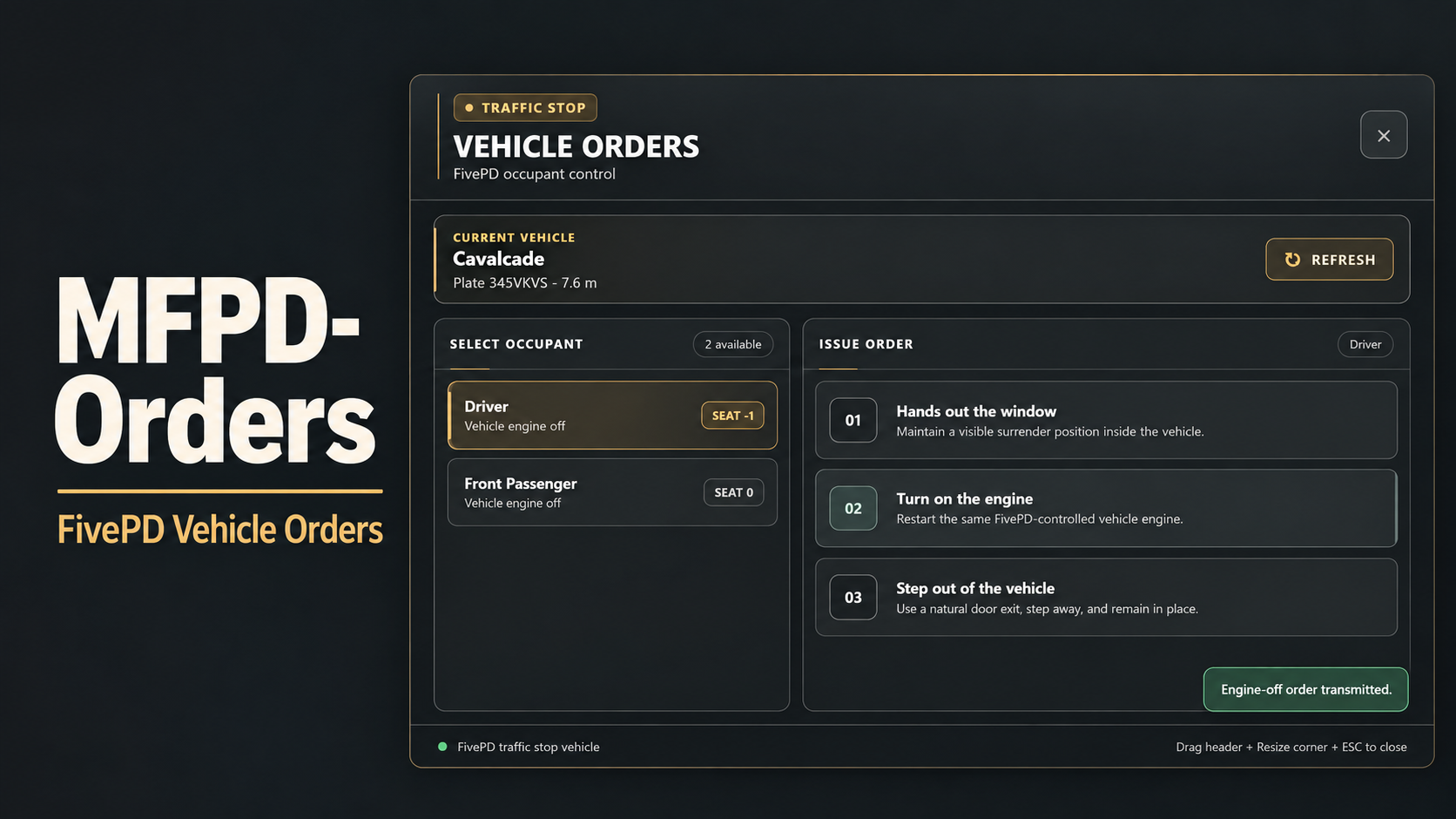
MFPD SCRIPTS • FIVEPD VEHICLE ORDERS
MFPD-Orders
Select an occupant. Give an order. Manage the stop.
Take control of NPC vehicle interactions with hands-out animations, driver engine orders, natural vehicle exits, and return-to-seat instructions through one clear in-game panel.
6 OCCUPANT ORDERS • FIVEPD CONTEXT • MOVABLE & RESIZABLE UI
SEE IT IN ACTION
Video preview
See MFPD-Orders in action before adding it to your FivePD server.
MFPD-ORDERS GAMEPLAY
Watch the MFPD-Orders video preview on YouTube →
Direct link to the gameplay video.
More control over your vehicle stops
MFPD-Orders adds targeted NPC vehicle orders to your FivePD patrols. Open the panel with /orders or /od, select the driver or a passenger, and choose an available action. The resource uses FivePD callout, traffic-stop, and recent interaction context to resolve a relevant vehicle, then presents its occupants and their current order states. By default, players must be on duty in FivePD to use it.
REQUIRED & INCLUDED IN THE PACK
Install both bundled resources
Your download includes MFPD-Orders and fivepd-compatlayer. The compatibility layer is required and supplies the FivePD event and context bridge used by the packaged setup, along with networked entity helpers.
Place both folders in your server's resources directory and start fivepd-compatlayer before MFPD-Orders. FivePD itself must already be installed and working.
OCCUPANT CONTROLS
Six orders in one panel
| Order | What it does |
|---|---|
| Hands out the window | Orders a seated NPC to hold a visible hands-out position using the included driver or passenger animation. |
| Stop hands-out position | Cancels the surrender animation while preserving the NPC's main vehicle task. |
| Turn off the engine | Orders the seated driver to switch off the selected vehicle's engine. |
| Turn on the engine | Reverses an engine-off order through the same driver control. |
| Step out of the vehicle | Tasks the NPC to exit through the vehicle door, step away, and remain in place. |
| Get back in the vehicle | Tasks an NPC previously ordered out to return naturally to the same assigned seat, provided it is available and within range. |
The panel adapts its buttons to the selected occupant's state. Engine controls appear for the driver; hands-out and seat orders are available for eligible drivers and passengers.
BUILT FOR YOUR FIVEPD PATROLS
Features and behavior
FEATURE 01
A clear, adaptable orders panel
- Select individual NPC occupants from a list labeled by seat.
- View the vehicle name, plate, distance, and FivePD context.
- Track hands-out, exit, outside, and return-to-seat states through the occupant list and action buttons.
- Drag the header to move the panel and drag its corner to resize it.
- Panel position and size are saved locally for reuse.
- Refresh the occupant list, receive order feedback, and close with the close button, Escape, or Backspace.
FEATURE 02
FivePD context and duty checks
- Supports relevant vehicles from accepted callouts, traffic stops, and recent FivePD NPC or vehicle interactions.
- Includes a proximity fallback for nearby, slow, occupied mission vehicles during native FivePD pullovers.
- Keeps pending dispatch callouts separate from accepted callouts and normal traffic stops.
- Uses the identified traffic-stop vehicle to keep occupant selection focused on the current stop.
- Retains ordered vehicle and seat context after occupants step out, allowing return-to-seat instructions.
- On-duty access is enabled by default and can be adjusted in
config.lua.
FEATURE 03
Included hands-out animations
- Includes separate hands-out animations for the driver and passengers.
- Lowers the corresponding intact window for supported front and rear seats.
- Maintains the animation while the NPC remains alive in the assigned seat.
- Can hold a stationary or slow-moving vehicle during hands-out orders, using configurable speed and freeze settings.
- Cancelling hands-out blends out the requested animation and releases that occupant's vehicle hold.
FEATURE 04
Natural exits and remembered seats
- Uses normal vehicle exit and entry tasks for NPC movement.
- After exiting, NPCs are instructed to walk away from their side of the vehicle and stand still.
- Keeps the original vehicle and seat assignment for a later return order.
- Checks that the assigned seat is free and the NPC is within the configured re-entry distance.
- Configurable retries, timeouts, walking speed, and step-away distance let you tune the behavior.
FEATURE 05
Driver engine control
- Issue engine-off and engine-on orders through the selected NPC driver.
- Engine controls are hidden when a passenger is selected.
- Includes repeated engine-state enforcement for configurable periods and an option to suppress immediate automatic restarts.
- Tune ignition timing, control requests, and engine hold durations through the configuration.
FEATURE 06
Synchronized NPC orders
- Replicates occupant and engine order state and routes execution to the relevant entity owners.
- Uses order revisions to avoid reapplying the same instruction unnecessarily.
- Validates current FivePD context, vehicle distance, routing instance, occupant seat, and return-seat availability before accepting an order.
- Orders target NPC occupants; player characters are excluded.
- Configurable rate limiting controls how frequently orders can be issued.
- Resource-stop cleanup releases managed vehicle freezes and NPC passive states.
Requirements and configuration
- Server: a FiveM server with OneSync enabled and a working FivePD installation.
- Required bundled resource:
fivepd-compatlayer, included together with MFPD-Orders in the pack. - Commands:
/ordersand/odby default; aliases are configurable. - Editable settings: duty requirements, FivePD detection, targeting distances, order timing, vehicle holds, animation refresh timing, exit and re-entry behavior, engine controls, and panel settings in
MFPD-Orders/config.lua. - Panel options: title, subtitle, default and minimum dimensions, movement, resizing, and whether the panel closes after an order.
- Language: English interface and order feedback.
GET STARTED
Installation
- Download and extract the package containing MFPD-Orders and fivepd-compatlayer.
- Place both resource folders in your server's
resourcesdirectory, keeping their folder names. - In
server.cfg, start the resources in this order:ensure fivepd ensure fivepd-compatlayer ensure MFPD-Orders - Adjust
MFPD-Orders/config.luafor your server and start the resources. - Go on duty in FivePD, approach a relevant NPC vehicle during a stop or accepted callout, and use /orders or /od to open the panel.
- Select an occupant and issue an available order. Use the alternate action to cancel hands-out, restart the engine, or return an exited NPC to the assigned seat.