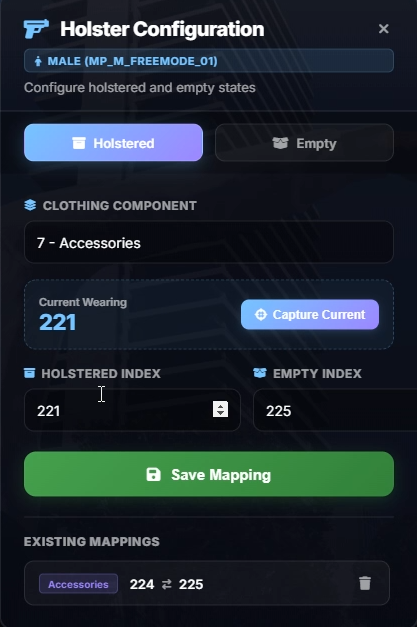
MFPD-Holsters is a dynamic clothing-swap holster system for FiveM police resources. When a player draws or holsters a compatible weapon, their clothing component (e.g., belt, accessories) automatically swaps between a "holstered" and "empty" drawable, creating a realistic on/off-holster visual effect.
Preview of functions: Click here to watch!
Configuration & Architecture
- Standalone: No framework dependency.
- Centralized Config File: All configurable values are located in
config.lua. This includes the master toggle, command name, weapon lists, animation settings, sound volumes, and notification messages. - ACE Permission Support: Optional ACE restriction for the configurator command. When enabled, only players with the specified permission can open the menu and save or delete mappings. Unauthorized players are silently ignored with no notification.
- Animation Settings: Fully configurable animation dictionaries and clips for unholster, holster, and stun gun sequences. Swap to any animation set without touching core logic.
Core Features
- Dynamic Clothing Swap: On weapon draw, the system scans all saved holster mappings for the player's ped model. If the current clothing drawable matches a "holstered" index, it swaps to the corresponding "empty" index. On holster, the reverse occurs, supporting multiple compatible outfits per component.
- Multi-Component Support: Configure holster mappings for any clothing component - Accessories, Armor, Top, Pants, Shoes, Mask, and more. Each component can have unlimited compatible drawable pairs.
- Per-Ped Model Mappings: Male and female MP peds store separate holster configurations. A holster mapping saved on a male ped does not interfere with female ped setups.
- In-Game NUI Configurator: The
/addholstercommand opens a draggable glassmorphism panel where players can select a clothing component, capture their currently worn drawable, set holstered and empty indices, and save, all visually without touching any file.
- "Capture Current" System: A dedicated button reads the player's active clothing drawable in real-time and fills the holstered or empty index field, eliminating guesswork and manual coordinate lookup.
- Append-Only Persistence: Saving a new holster mapping adds to the existing list, never overwrites previous entries. Each mapping is stored as a unique (ped model, component, holstered index, empty index) combination, allowing multiple compatible holsters per component.
- Individual Deletion: Each saved mapping displays in the "Existing Mappings" list with a delete button. Removing one entry does not affect others for the same component.
- Control Blocking: Player firing, weapon wheel, and movement inputs are disabled during holster/unholster animations to prevent animation cancellation and visual glitches.
- Audio Feedback: Configurable holster and unholster sound effects via
.oggfiles played through the NUI audio system.
- Vehicle & Parachute Safety: Holster logic automatically skips when the player is in a vehicle, entering a vehicle, wearing a parachute, or in free fall, preventing clothing conflicts.
- Server-Side Sync: Mappings are stored in
data/savedholsters.jsonon the server. On resource start and after every save or delete, all connected clients receive the updated mapping list instantly.
- ESC to Close: The NUI panel can be closed via the X button or the ESC key, with NUI focus properly released in both cases.
Configuration Highlights
- General: Master toggle to enable/disable the entire system, configurable command name, and optional ACE permission restriction for the configurator.
- Weapon Tables: Add or remove weapon hashes from the pistols list and stun guns list in
config.lua.
- Animations: Four configurable animation entries - unholster dict/clip, holster part 1 dict/clip, holster part 2 dict/clip, and stun gun dict/clip.
- Sounds: Adjustable volume for holster and unholster sound effects. Place
holster.oggandunholster.oggin thehtml/sounds/directory. Set volume to 0.0 to disable.
- Notifications: Fully customizable notification title, subtitle, message, type, and duration for both save and delete actions.
- Data File: Holster mappings persist in
data/savedholsters.json, automatically created on first save. Safe to edit manually or delete to reset.
Note: Works standalone with no framework required. Compatible with any police uniform or EUP outfit system. Mappings are ped-model-specific, so different outfit sets for male and female characters are fully supported.