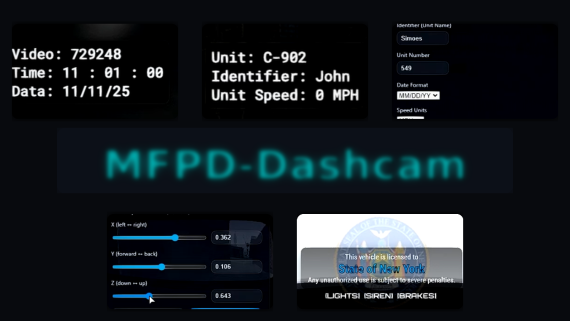
MFPD-Dashcam is a premium, framework-aware dash camera system for emergency vehicles, featuring a clean dashcam overlay, per-model mount editing, advanced custom camera viewpoints, per-player preferences, language packs, job-based permissions, and an optional realistic Axon Fleet-style overlay. Preview: Click HERE to watch the official video preview.
NEWEST UPDATE PREVIEW - Watch it!
What’s inside:
- Framework-aware job checks: optional permission system that limits usage by job or group when a framework is enabled. Supports
Standalone,ESX,ESX_NEW,QBCOREwith on-duty support,QBOXusing primary group checks, andVRP. Standalone lets everyone use it. Denials are silent and spam-free. - Customizable commands: configure command names directly in
config.luathroughDashcamConfig.Commands. Default commands include/dashcoords,/dashconfig, and/dashvideo. - Language packs: ready-to-use locales for EN, PT-BR, DE, FR, and ES. Switch language using
DashcamConfig.Locale. Overlay labels and menu text update from the selected locale. - Per-model dash position editor:
/dashcoordsopens the original live X Y Z mount editor for the default dashcam position. This system remains separate from the advanced camera system. - Advanced custom camera editor:
/dashvideoopens a new NUI editor for creating fully custom named camera viewpoints, including front dashcam, rear camera, side cameras, prisoner view, cabin view, or any other custom perspective. - Axon Fleet-style overlay option:
/dashconfigincludes a full NUI style selector. You can keep the original MFPD dashcam overlay or switch to a minimal Axon Fleet-style top-right overlay with transparent background, timestamp, Fleet label, serial, and logo. - Live Axon overlay resizing: the Axon Fleet overlay size can be adjusted in
/dashconfigwith a slider, and the preview updates live while sliding. - Instant HUD refresh on Save: saving personal settings in
/dashconfigupdates the active dashcam overlay immediately.
Core features
- Clean MFPD dashcam overlay: displays time, date, unit number, identifier, speed, and a center banner with three lines. Status indicators show Lights, Siren, and Brakes in real time.
- Realistic Axon Fleet-style mode: optional compact top-right overlay inspired by modern in-car law enforcement dashcam systems. It removes the full default dashcam UI and displays only the essential Fleet-style timestamp, device line, serial, and logo.
- Transparent overlay design: the Axon Fleet mode has no black backdrop, no full-screen background, and no unnecessary visual clutter. It stays readable while keeping the game view clean.
- Per-model default dash position: use
/dashcoordsto adjust the default dashcam mount per vehicle model with live X Y Z sliders. - Advanced camera positioning: use
/dashvideoto create custom cameras with name, X position, Y position, Z position, pitch, roll, yaw, and FOV controls. - Named custom viewpoints: every custom camera can have its own name, making it easy to create positions like Front Dashcam, Rear Camera, Left Side, Right Side, Cabin View, or Prisoner View.
- Camera cycling with C: pressing
Ccycles through the default camera and all saved custom camera viewpoints. HoldingCturns the dashcam view off. - Configurable C hold timing: the hold-to-disable timing is controlled from
config.lua, allowing server owners to fine-tune how quickly the dashcam exits. - Per-player preferences: unit name, unit number, date format, speed units, dashcam NUI style, and Axon overlay size are saved per player and persist across sessions.
- Vehicle restriction options: restrict usage by emergency class, custom vehicle allowlist, or leave it open depending on your server setup.
- Framework-aware permissions: when a framework is selected, only configured jobs can toggle the dashcam, open the editor, or use restricted features. Standalone ignores jobs.
- Performance-focused: lightweight loops, silent permission checks, no unnecessary spam prints, and clean NUI behavior.
Commands and permissions
- Commands:
DashcamConfig.Commands = { Coords = "dashcoords", Config = "dashconfig", Video = "dashvideo" }
Change these names inconfig.luato match your server style. - /dashcoords:
Opens the original default dashcam mount editor with live X Y Z sliders. This is used for the main/default camera position per vehicle model. - /dashvideo:
Opens the advanced camera viewpoint editor. Create, name, save, delete, and fine-tune multiple custom camera positions per vehicle model. - /dashconfig:
Opens the personal settings menu for unit details, date format, speed units, NUI style, and Axon Fleet overlay size. - Framework:
DashcamConfig.Framework = "Standalone" | "ESX" | "ESX_NEW" | "QBCORE" | "QBOX" | "VRP" - Jobs:
DashcamConfig.JobsDashcam = { police = true, sheriff = true, ems = true, ... } - Editor ACE gate:
DashcamConfig.EditorACE = { RequireWhenFrameworked = false, Permission = "dashcam.edit" } - Save protection:
DashcamConfig.RequireACE = falseandDashcamConfig.ACEPermission = "dashcam.edit"can be used to protect writing saved offsets and camera positions. - ACE example:
add_ace group.admin dashcam.edit allow
Configuration highlights
- Locale and language packs:
DashcamConfig.Locale = "en"DashcamConfig.Locales = { ["en"] = {...}, ["pt-BR"] = {...}, ["de"] = {...}, ["fr"] = {...}, ["es"] = {...} } - Date and speed:
DashcamConfig.DateFormat = "MM/DD/YY" | "DD/MM/YY"DashcamConfig.unitSpeedType = "MPH" | "KM/H" - Vehicle restrictions:
DashcamConfig.RestrictVehicles = trueDashcamConfig.RestrictionType = "class" | "custom"DashcamConfig.AllowedVehicles = { "police2", ... } - Default dashcam mount:
DashcamConfig.DefaultOffsets = { x = 0.0, y = 0.50, z = 0.82 } - Custom dashcam viewpoints:
DashcamConfig.CustomDashVideoCameras
Stores custom named camera viewpoints per vehicle model, including position, rotation, and FOV data. - Dashcam controls:
DashcamConfig.Controls
Configure the dashcam cycle key and hold-to-disable time for theCkey behavior. - Axon Fleet-style overlay:
DashcamConfig.AxonFleet
Configure serial text, logo behavior, default size, minimum size, maximum size, and resize step.
Advanced /dashvideo camera system
- Create unlimited practical viewpoints per vehicle model.
- Name each camera position directly from the NUI.
- Adjust camera placement with advanced sliders for position, rotation, and FOV.
- Save custom views such as front dashcam, rear camera, side cameras, cabin camera, prisoner camera, and more.
- Cycle through saved viewpoints in-game using the
Ckey. - Turn off dashcam view by holding
Cfor the configured hold time. - Default dashcam position remains independent from custom camera viewpoints.
Axon Fleet-style NUI mode
- Selectable from
/dashconfig. - Completely replaces the classic MFPD dashcam overlay when enabled.
- Displays a compact top-right Fleet-style overlay.
- Shows date, time, timezone, Fleet line, serial, and logo.
- No vehicle model line, no unit line, no unnecessary extra data.
- Transparent background with no black box or full-screen overlay.
- Resizable directly from
/dashconfigwith live preview while sliding.
Some notes
- Immersive but unobtrusive: polished dashcam visuals, readable typography, and instant feedback without clutter.
- Admin control: per-model mounts and custom camera data are handled through
config.lua, with optional ACE protection for sensitive editor actions. - Player agency: each user can personalize unit name, callsign, date layout, speed units, overlay style, and Axon Fleet overlay size.
- Flexible camera setup: server owners can build realistic multi-camera dashcam setups for different vehicle models.
- Drop-in friendly: single resource, clear configuration, no database setup required.
Includes also
- Full transparent NUI system with responsive menus
- Classic MFPD dashcam overlay
- Optional Axon Fleet-style overlay
/dashcoordsdefault mount editor/dashvideoadvanced custom camera editor/dashconfigpersonal settings menu- Client and server scripts with real-time updates
- Per-player KVP saved preferences
- Per-model saved dashcam offsets
- Per-model custom named camera viewpoints
- Language packs for EN, PT-BR, DE, FR, ES
- Commented
config.luawith commands, framework selection, jobs, ACE, vehicle restrictions, controls, Axon Fleet settings, and camera defaults
Deliver realistic police dash camera visuals, support multiple camera viewpoints, keep control in admin hands, and give players the customization they expect.