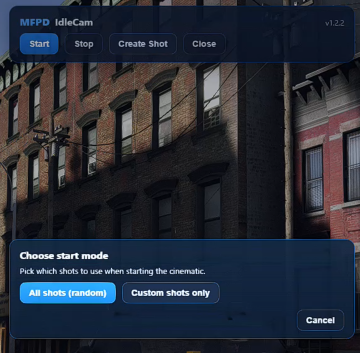
MFPD-IdleCam is cinematic camera shot resource that takes inspiration from going "AFK" in racing games; Built-in with a Creator as well to allow your creativity to generate awesome takes. Easy to use.
Compatibility: Standalone. Uses plain FiveM client/server events and a chat command so it will work on any server framework.
Main commands: /idlemf (opens the NUI menu, configurable with Config.Command) and /setcam (used while in the freecam creator to mark start and end points).
Freecam shot creator: The NUI contains a Create flow that attaches a freecam to the selected vehicle. Use the freecam controls to position start and end points, preview the single-shot playback, then Cancel, Retry or Confirm with on-screen buttons. Confirmed shots are saved server-side (Directly to the config.lua).
Default freecam controls (built-in mapping): WASD to move, mouse to look, mouse wheel to zoom, Shift to move faster, Space to ascend, Ctrl to descend, Q/E to roll. Controls are shown in the creator UI for precise framing while previewing.
NUI and integration: UI files are web/index.html and web/script.js. The NUI provides Start, Stop and Create buttons and a small creator overlay with Cancel, Retry and Confirm. Press Escape to close the menu. NUI actions send commands to the client script which runs the camera engine and the creator flow.
Shot persistence and live updates: Confirming a custom shot triggers a safe server-side write that appends the shot to config.lua. The server then broadcasts the new shot to clients so the shot pool updates live without restarting the resource.
Camera behavior and options: Adjustable options live in config.lua. You can configure base field of view, speed scaling, look-at offsets, cinematic bars, and optional HUD hiding. Enabling the idle camera can also enable cinematic black bars and hide HUD elements according to the config.
Runtime add and preview: The camera engine supports runtime shot injection and single-shot previewing so you can test newly created shots immediately. When a shot is added the server notifies players in chat.
Editable files: Only config.lua will be left open for edits. The remaining code is protected under escrow.
Notes and tips
Make sure the server process has write permission for the resource folder before using the creator Confirm/Save feature. Without write access the save will fail.
The Camera Shot Creator expects you to be in a vehicle while creating shots for that vehicle; the NUI will show whether Start is allowed for your current state.
Back up config.lua before performing bulk manual edits if you prefer to track versions yourself.
If you want to change the open command, edit Config.Command in config.lua.