MFPD-Spotlights
Video Preview:
Preview: Click here to watch!
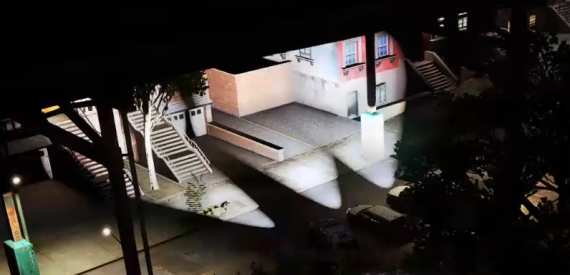
MFPD-Spotlights is a configurable and fully network-synchronized vehicle spotlight system for FiveM.
It provides realistic vehicle-mounted spotlight illumination for emergency vehicles, turreted vehicles, and helicopters, with independent controls for the driver and front passenger.
The system can automatically detect spotlight locations already modeled into compatible vehicles. Vehicles without automatically detected locations can be configured directly inside the game through the complete spotlight placement editor.
Realistic Spotlight System
Realistic vehicle-mounted spotlight illumination.
Configurable volumetric lighting around the spotlight source.
Automatic detection of compatible spotlight locations modeled into vehicles.
Independent driver and passenger spotlights.
Independent position and direction for each vehicle side.
Support for emergency vehicles, turreted vehicles, and helicopters.
Custom placement support for vehicles without automatically detected spotlight locations.
Spotlight Modes
Manual Mode: Move the spotlight using the configured directional controls.
Locked Mode: Keep the spotlight aimed in its current world direction while the vehicle moves.
Tracking Mode: Automatically follow a selected vehicle or pedestrian.
Vehicle Plate Search: Displays the license plate of the tracked vehicle.
Automatic Sweep: Automatically scans the surrounding area using the configured movement limits.
Strobe Mode: Continuously flashes the active spotlight.
Default Controls
Toggle spotlight: OEM_7 (
~)Aim up: Page Up
Aim down: Page Down
Aim left: Delete
Aim right: End
Increase spotlight radius: Numpad +
Decrease spotlight radius: Numpad -
Lock spotlight direction: E
Track selected target: Left Shift
Toggle strobe mode: Right Shift
Toggle aiming crosshair: N
Toggle spotlight information panel: Comma
Registered controls can be rebound through the FiveM key bindings menu.
Optional Player Interface
Optional aiming crosshair.
Optional spotlight information panel.
Displays the active vehicle side, spotlight mode, tracking status, strobe status, and tracked vehicle plate.
The information panel can be repositioned by each player.
The selected panel position is saved individually.
Complete In-Game Configuration Editor
Create spotlight definitions for the driver and passenger sides.
Edit, duplicate, and delete existing spotlight definitions.
Place spotlights directly on vehicles using an interactive 3D placement tool.
Use vehicle-relative positioning for accurate placement on any compatible model.
Preview suggested spotlight locations detected on the vehicle model.
Orbiting editor camera with mouse movement, rotation, zoom, recentering, and smooth transitions.
Direction snapping for faster spotlight alignment.
Live preview of the spotlight position, direction, and appearance.
Live preview of vehicle extras and modkit variants.
Support for automatic, persistent, vehicle extra, and modkit spotlight definitions.
Optional high-beam linking for compatible spotlight definitions.
Configurable Spotlight Appearance
RGB light color.
Brightness.
Illumination distance.
Spotlight radius.
Light fall-off.
Inner and outer beam shape.
Volumetric source-light appearance.
Minimum and maximum horizontal movement angles.
Minimum and maximum vertical movement angles.
Live Configuration Workflow
Load the current live spotlight configuration.
Load a previously saved draft.
Save unfinished configurations as drafts.
Paste a complete spotlight configuration directly inside the game.
View and copy configuration data from the editor.
Save changes directly to the active spotlight configuration.
Apply live changes without restarting the resource.
Synchronize updated configurations with connected players.
Vehicle Compatibility Options
Configurable support for emergency vehicles.
Configurable support for turreted vehicles.
Configurable support for helicopters.
Optional helicopter model restrictions.
Optional remote control of the last entered vehicle while the player remains nearby.
Option to allow spotlights only on explicitly configured vehicles.
Configurable ignored vehicle models and vehicle classes.
Optional administrative permission requirement for access to the configuration editor.
Network Synchronization
All nearby players see the spotlight state and movement in synchronization.
Spotlight direction, radius, active mode, tracking, and strobe state are synchronized.
Driver and passenger spotlights remain independently synchronized.
Live configuration changes are distributed to connected players.
Commands
/spotlight- Toggles the spotlight for the occupied front seat./autospot- Toggles automatic spotlight sweeping./spotlightcrosshair- Toggles the aiming crosshair./spotlightnui- Toggles the spotlight information panel./changespothud- Repositions the spotlight information panel./spotlightconfig- Opens the in-game spotlight configuration editor.
Installation
Place the resource inside your server resources directory.
Add
ensure MFPD-Spotlightsto yourserver.cfg.Adjust the available configuration options when required.
Use
/spotlightconfigin-game to create or edit vehicle spotlight definitions.
The resource is escrow protected. The relevant configuration and spotlight definition files remain editable.