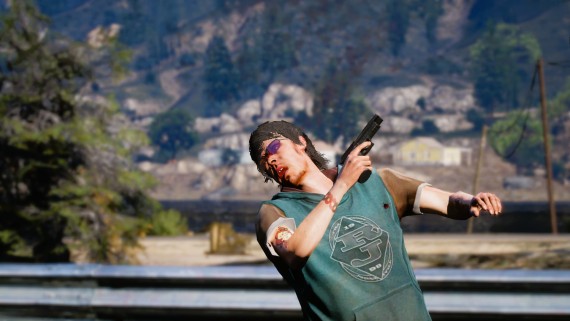
MFPD - RealisticDamages:
MFPD - RealisticDamages introduces a more authentic damage and built-in healing system. When players are shot or hit, a brief ragdoll is triggered to simulate the impact and the sensation of pain.
Injuries accumulate over repeated hits, eventually causing severe damage that slows the player down and alters their walk style to reflect their wounded state.
UPDATE 3.0 PREVIEW: 3.0 Video Preview
WATCH THE VIDEO PREVIEW
Injury System
- Bone-Based Damage: Specific bones (such as the head and neck) trigger heavier ragdoll effects and can lead to a more rapid onset of severe injuries.
- Accumulating Injuries: Multiple hits build up damage, which may eventually force a player into a severely injured state characterized by slower movement and a limping walk style.
- Healing Mechanics: Both a medbag and tourniquet system enable players to heal themselves or assist others, restoring normal movement and clearing visible injuries.
- Gas Exposure: BZ gas and smoke grenades trigger a visible coughing animation, synced to nearby players. Wearing an approved gas mask provides full immunity to gas effects.
Cooldown Configuration
The resource contains a brief cooldown to prevent softlocks if multiple shots or hits occur.
If you wish to adjust the cooldown, modify in config.lua:
Config.DefaultRagdollTime = 2000
Features:
Bone-Based Damage:
Certain bones trigger heavier ragdoll effects, meaning a shot to a critical area (like the head or neck) will have a more severe impact. The full skeleton is covered — head, neck, spine chain, pelvis, arms, hands, and legs all have individually tuned ragdoll times and force values.Short Ragdolls:
Brief knockdowns create a tactile sense of shock during gunfights without overly disrupting gameplay.Screen Blur & Impact Effects:
Hits to the head, neck, or spine trigger a screen blur, camera shake, and a cinematic fade-to-black effect to simulate disorientation. The fade is implemented in a recording-safe way so active Rockstar Editor clips are never interrupted. All timing values are fully configurable, and the fade-to-black can be disabled independently while keeping the blur and shake.Severe Injuries:
With enough damage, players become severely injured—slowing them down and forcing a change in their walk style.Medbag System:
- Pickup & Carry: Acquire a medbag from an allowed vehicle class's trunk.
- Self-Heal: Use the medbag to restore your normal walk style and clear injuries if severely wounded.
- Heal Others: Apply the medbag to other injured players to help them fully recover.
Tourniquet System:
A second medical item available alongside the medbag, designed for faster field treatment.- Pickup & Carry: Retrieve a tourniquet from an allowed vehicle's trunk. You can only carry one item at a time.
- Self-Apply: Apply the tourniquet to yourself with a 5-second progress animation and audible velcro sound effect, clearing your severe injury state.
- Apply to Others: Use the tourniquet on another player via ox_target or qb-target, triggering a medic animation and synced sound for nearby players.
Gas & Mask System:
BZ gas and smoke grenades trigger a looping cough animation that repeats for as long as the player remains exposed, synced to nearby players so others can see it. Players wearing an approved gas mask drawable are fully exempt from all gas effects. Use the built-in/gathermaskdev command to quickly identify your mask's drawable ID and add it toConfig.Gas.MaskExemptDraws.Optional No-Death Mode:
SetConfig.NoDeathtotrueto maintain maximum health and fully enjoy the ragdoll and realistic effects without the worry of dying! UseConfig.MinHealthThresholdto fine-tune the exact health floor — a higher value gives a safer buffer, while a lower value keeps players closer to the edge. Automatic revives are included (if for some reason you still die), or disable it for normal mortality.
In any configuration, you experience the same effects; the only difference is that you die normally if set to false.
- Vehicle Classes Config:
MFPD-RealisticDamages includes aConfig.AllowedClassesoption. In addition to the existing allowed vehicle class (emergency vehicles, class 18), you can add more classes to control interactions like medbag and tourniquet pickup and storage.
Failsafe Mechanisms:
Built-in failsafes ensure the system cleans up properly when a player dies, disconnects, or is removed. Temporary objects (like medbags and tourniquets) and animations are cleared safely to prevent unintended behavior.
Requirements
ox_lib (or QBCore equivalent)
Used for notifications, progress bars, and UI elements. Supportsox,qb, or a fullycustomprovider viacustom_notify.lua.ox_target (or qb-target)
Enables context-based interactions with vehicles, players, and items. SetConfig.TargetSystemto'ox'or'qb'depending on your framework.
Configuration
- All fine-tuning is done through
config.lua, including settings such as ragdoll duration, bone-specific force, blur timing, gas behavior, and allowed vehicle classes. Config.NoDeathcontrols whether players auto-revive at maximum health or experience full injury and mortality.Config.MinHealthThresholdsets the exact health floor when NoDeath is enabled (default: 115).Config.AllowedClassesspecifies vehicle classes allowed for medbag and tourniquet interactions—extending beyond default emergency vehicles (class 18).Config.BlurBonesdefines which bones trigger the screen blur and fade effect when struck.Config.EnableScreenFadeEffecttoggles the fade-to-black independently of the blur and camera shake.Config.Gas.MaskExemptDrawslists mask drawable IDs that grant full gas immunity. Use the/gathermaskcommand in-game to find the correct ID for any mask.Config.Localesets the active language. Built-in translations available for English, German, Spanish, Portuguese (BR), and French.
- Regular updates and patches provided to maintain compatibility and address issues.